
Post-pandemic life has led many people to transition to remote work, allowing them to have flexible work and social schedules. However, these remote workers feel that they could be more social – personally and professionally. By improving Google Calendar, a web app they use daily to organize their time, we can prompt remote workers to schedule time with friends and coworkers more often than usual.
Role — UX Researcher and UX/UI Designer
Time — 10 weeks
Team — Kelly Nham, Saul Jimenez
Background
When it comes to working during the ongoing pandemic, it is important that people have a good work-life balance. A Spring Health study found that 76% of workers were experiencing burnout in December 2020, with some workers citing a “lack of work-life boundaries” as a trigger for this stress. In order to keep things moving as they did pre-pandemic we must not only allow people to have flexible work schedules such as working remotely, but also give them the space and resources to take mental and physical breaks to rest and rejuvenate. In the end, it benefits the health of the professional as well as the productivity of their workplace.
Since many have transitioned from in-person to remote work over the course of the pandemic, we want to be able to help these professionals maintain a healthy lifestyle in spite of these drastic changes to their daily lives.
User Interviews
To better understand the pros and cons of working remotely, especially in terms of one’s health and productivity, we conducted 8 interviews with people of various ages and stages of life who currently work or have previously worked remotely. We asked them about their experience working remotely, their opinions of this experience, how they view their work-life balance, their mental and physical health, as well as how they stay organized. You can find a sample of these questions here.
By conducting these interviews, we were able to uncover some of the trends within the lives of remote workers.
Findings
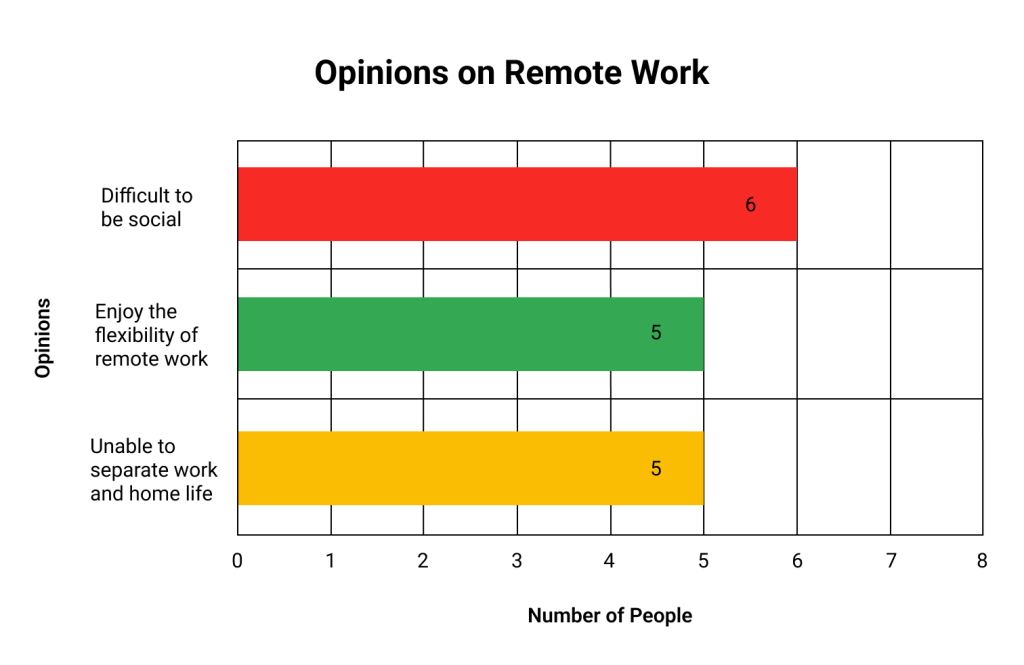
The most common problem remote workers feel they face within their work-life balance is a lack of social life now that they are very rarely in the office. This was concerning, as social interactions are crucial to maintaining mental and physical health and team-building at work, therefore a lack of social interactions may negatively affect overall productivity.
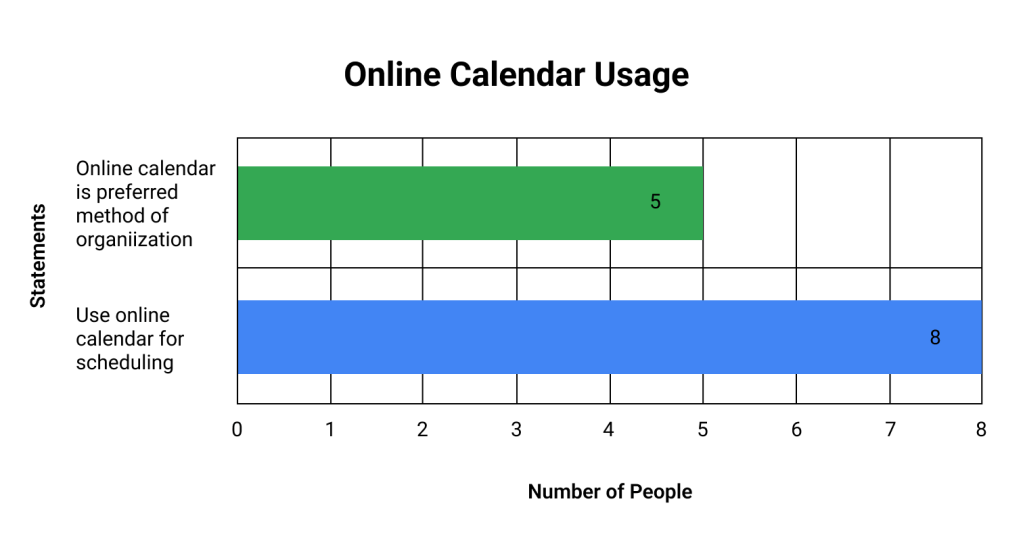
All 8 of the interviewees use an online calendar to block periods of time on their schedule, schedule meetings with coworkers, and remind themselves to do certain activities via notifications.
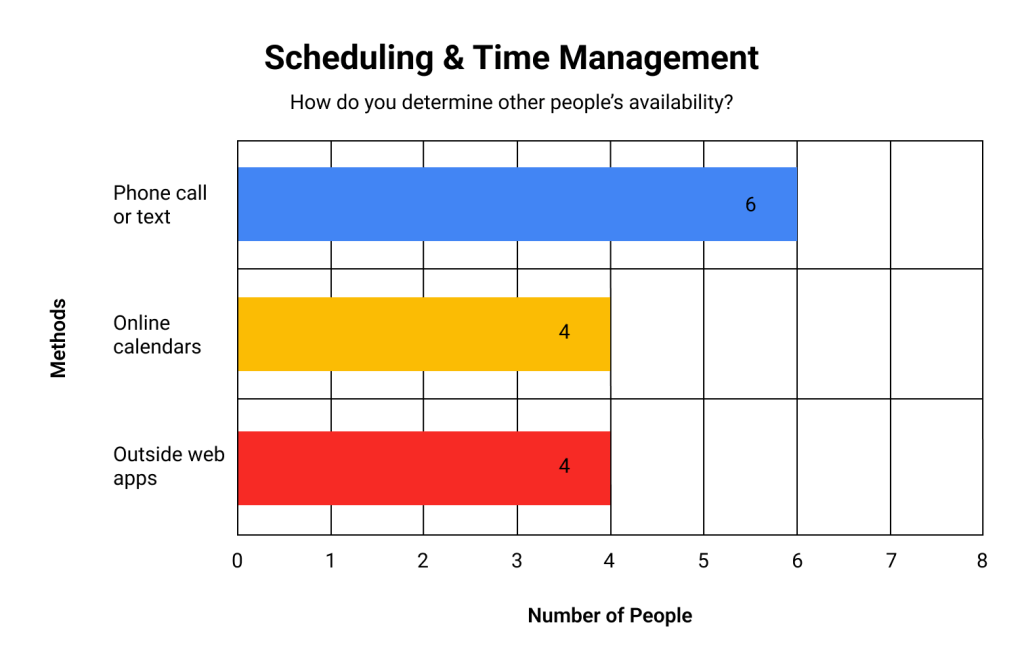
The most common problem that they face in their productivity is that their varied methods of scheduling meetings are counterproductive. Users either have to manually search for a time to schedule meetings on their online calendars or integrate another online schedule comparison app into their work tasks. The more steps the user has to take in order to complete these steps, the more cognitive load they encounter in scheduling meetings.
Problem
How might we expand the calendar app experience to make schedule comparison and meeting scheduling easier, therefore helping remote workers be more social?
Solution
Since all 8 of our participants used calendar apps to manage their day-to-day life at work and home, we decided to focus on the potential of Google Calendar. Our participants had no streamlined way to schedule events with others, and we figure that this barrier to easily collaborating with coworkers not only limits their productivity for work meetings but also discourages users from setting up casual meetings for social time. We gave this app 3 more features to expand its scheduling capabilities. In this way, we can prompt users to easily plan social or team-building events into their work days, thus allowing them to become more mentally happy and healthy.

Feature 1 – Adding Friends & Tags
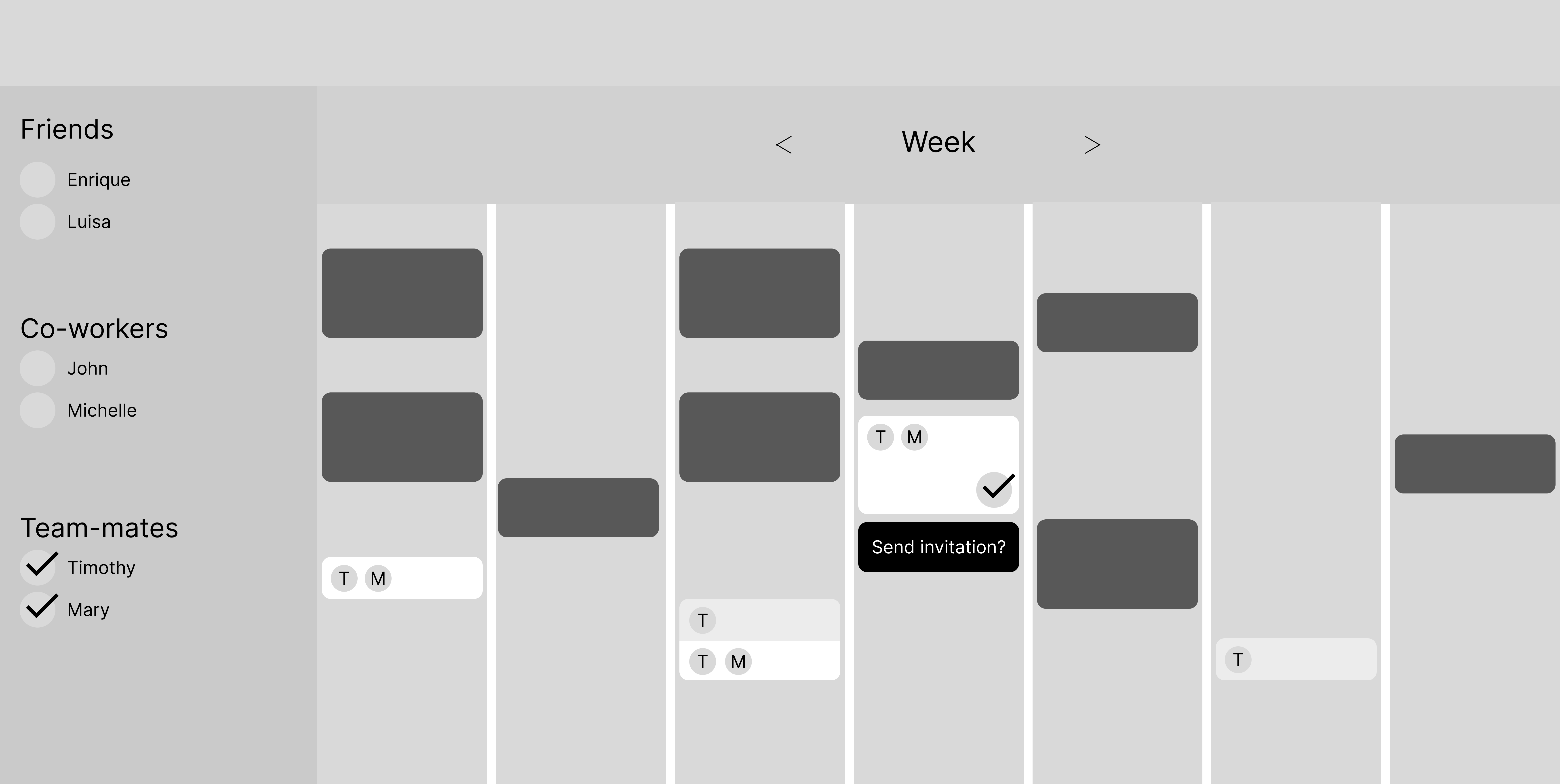
The first feature we created allows the user to request others’ calendars to compare schedules, as Google Calendar currently only allows you to compare if action is taken on the other users’ end. This provides the user with healthy social interaction since they can add everyone that they would possibly like to schedule with without sending them an awkward text to check their availability. We also suggested the ability to add tags to contacts (such as Friends, Work, School, etc) so that users can narrow down invitees depending on they type of event they’d like to schedule. In this way, our users can create their own social circles that can remain as professional as they’d like.

Feature 2 – Automatic Meeting Suggestions
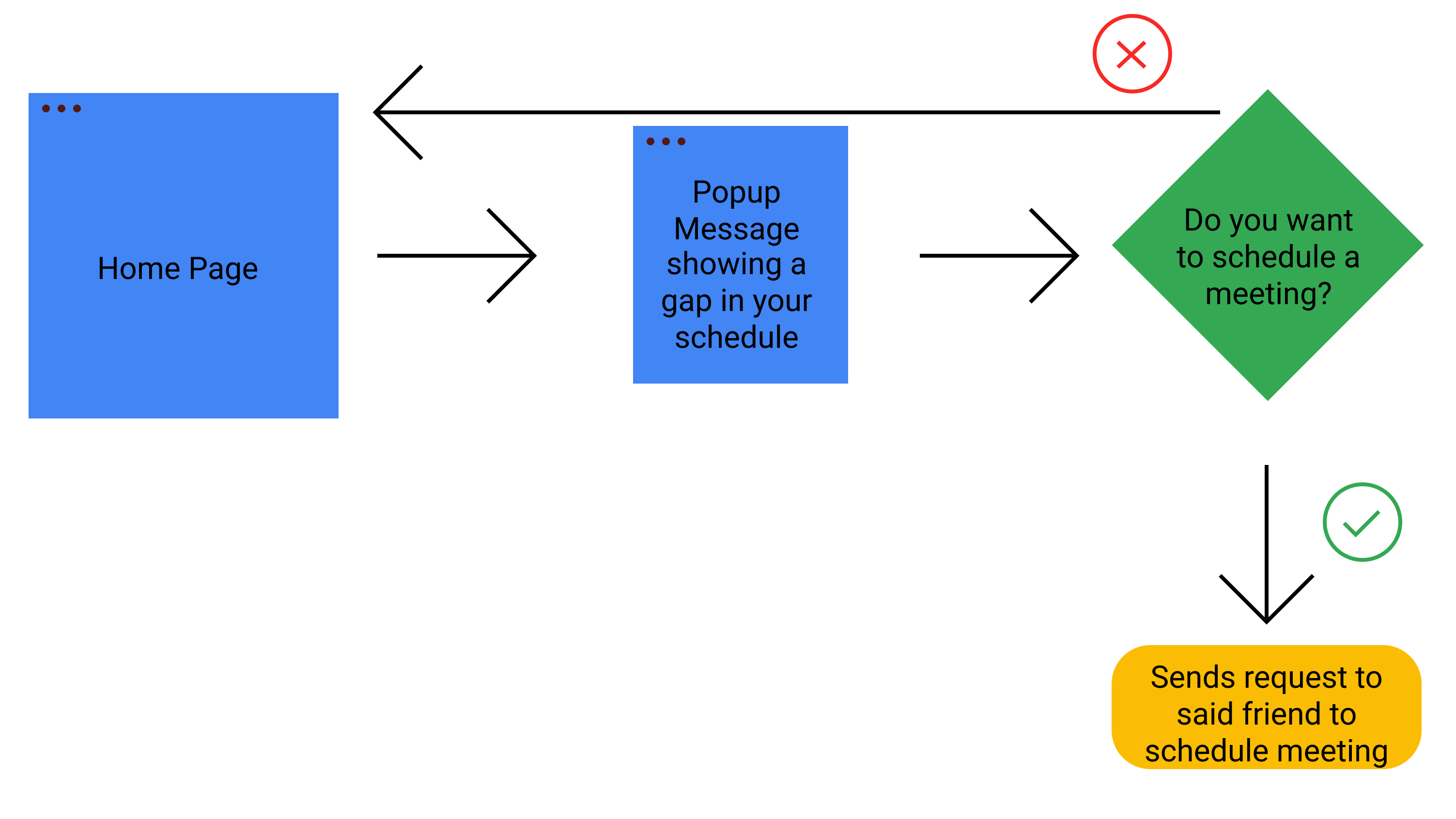
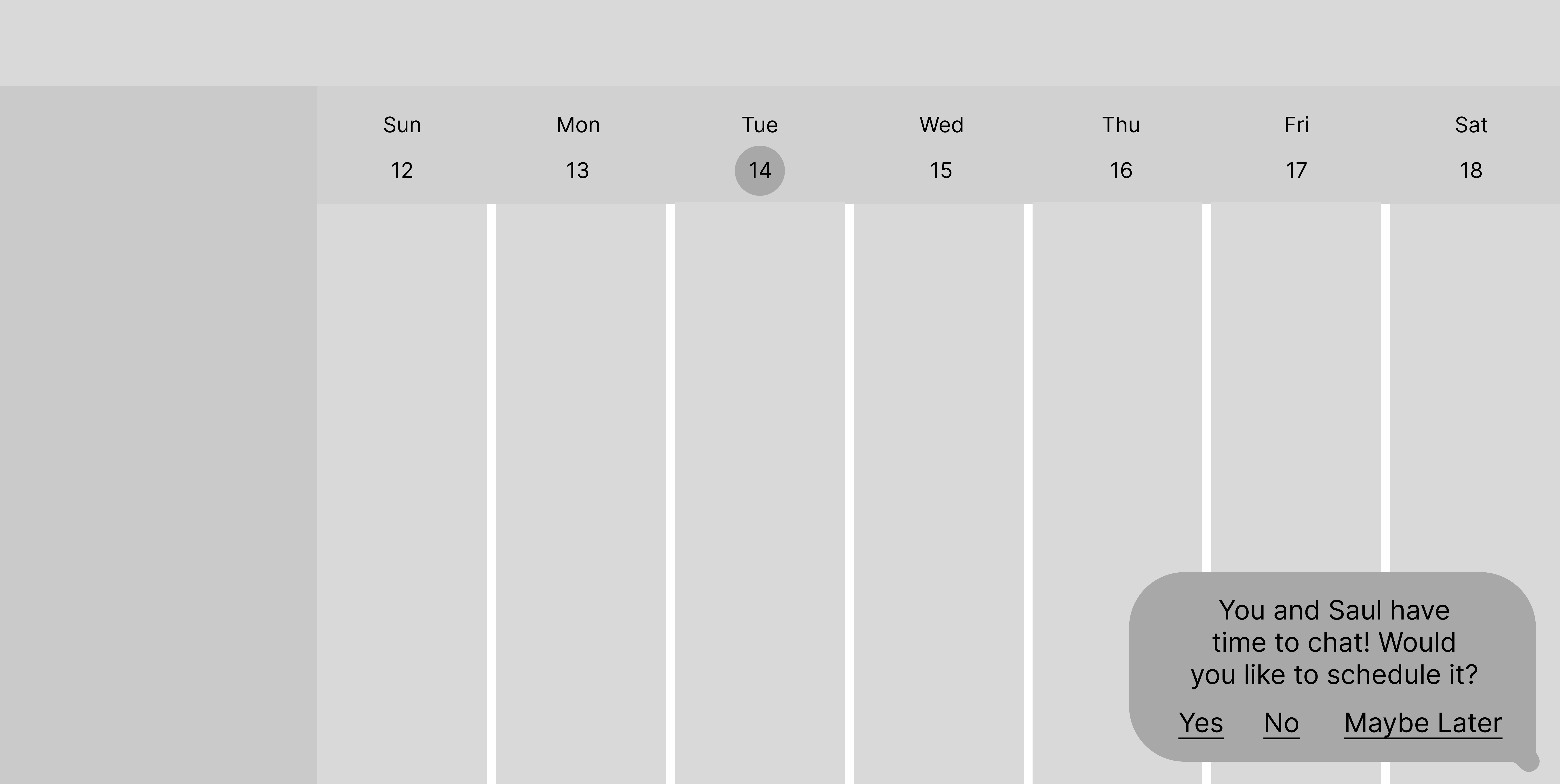
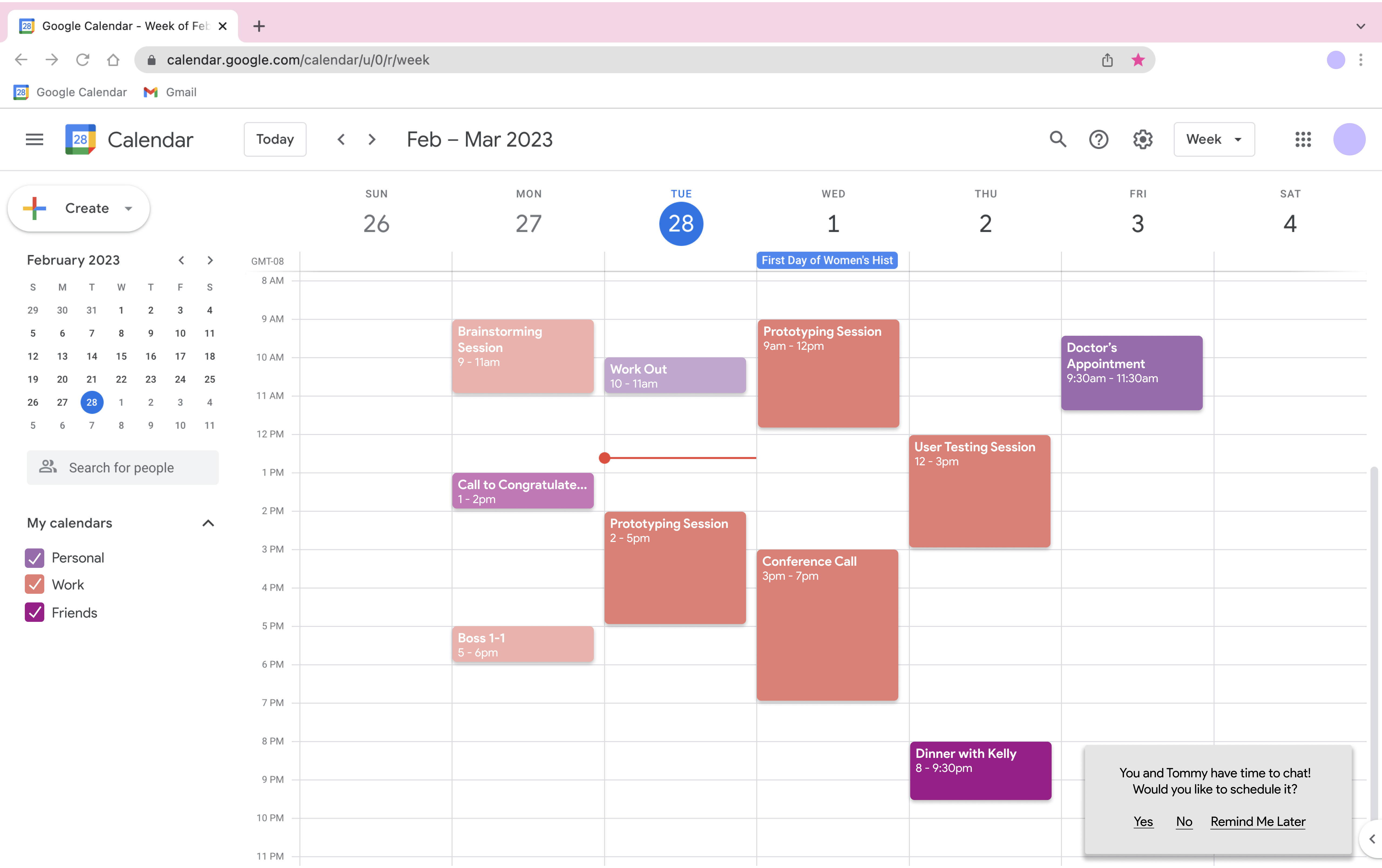
Our second feature works first in the background to find gaps in the user’s schedule and automatically compare them with their contacts’ gaps in their schedules. A pop-up appears highlighting a gap in time that they share with a friend and suggests an activity to add to their calendars based on the length of time they have to spend. This allows a user to get to know other people in the office that they wouldn’t usually hang out with or friends that they did not know had free time as well. The user is prompted to have more social interaction at work since much of the hard part (comparing schedules to find others who are available at the same time and deciding on an activity) is already done for them.
Feature 3 – Manual Meeting Scheduling
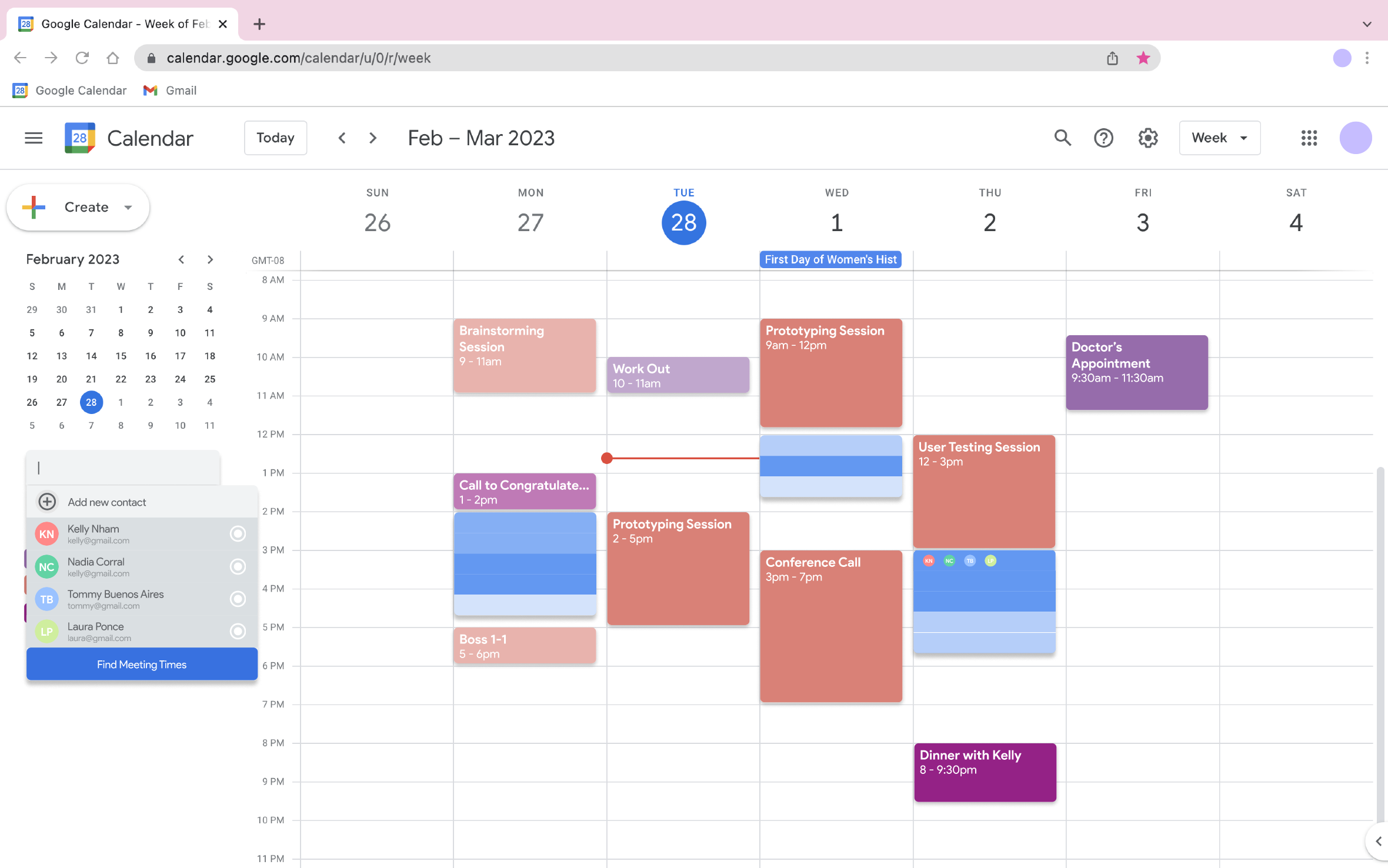
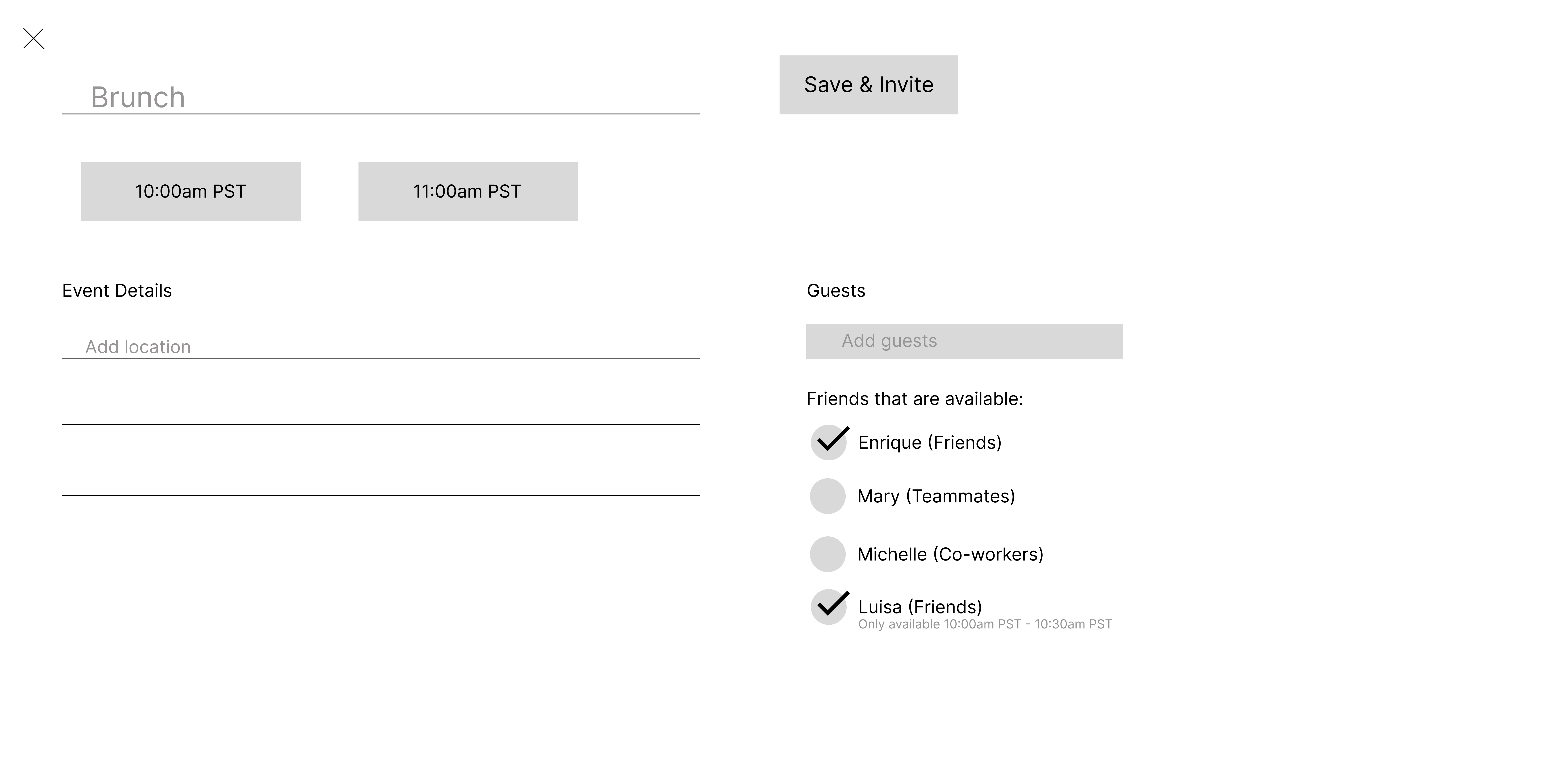
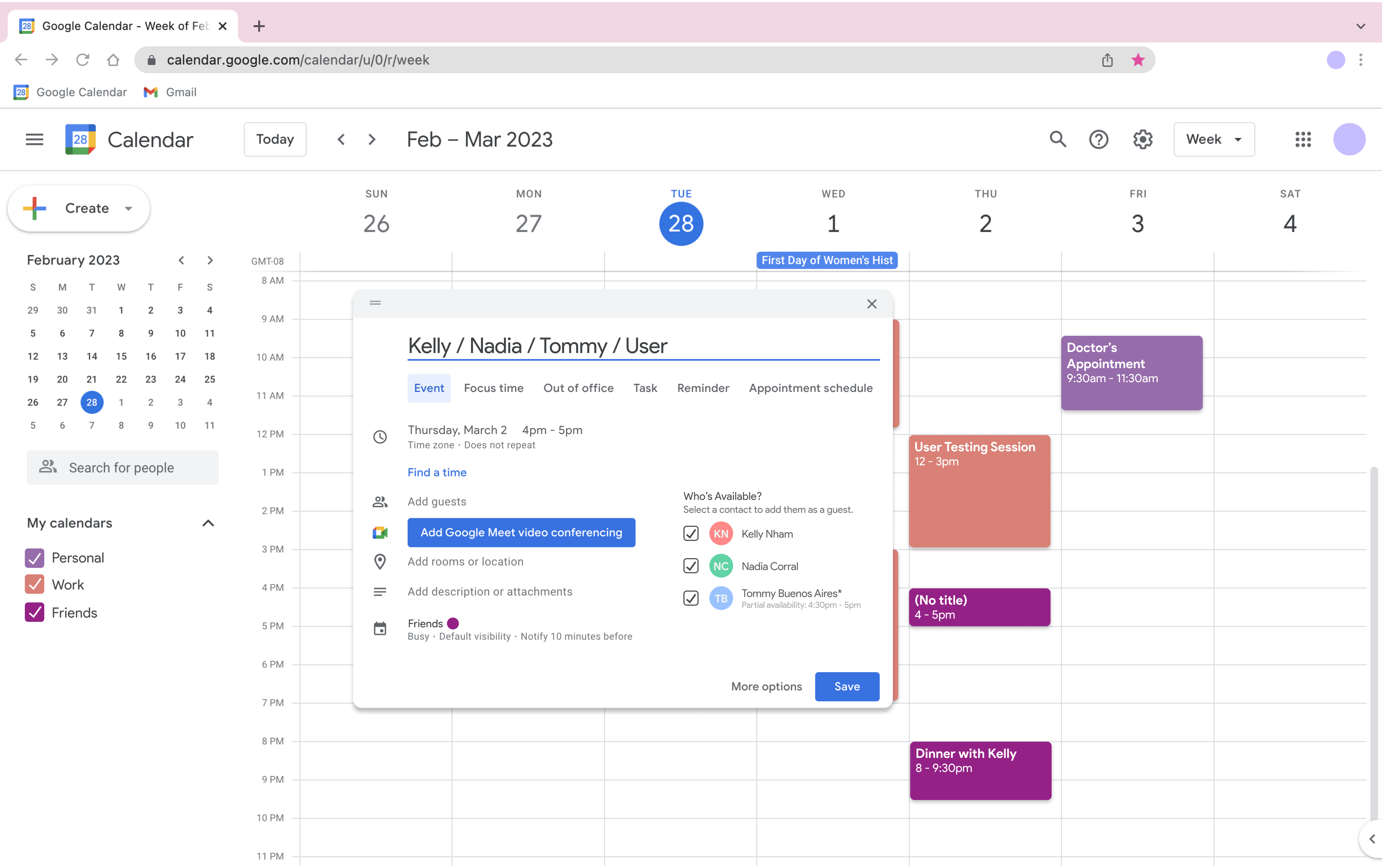
Our final feature includes a prompt to invite others that will appear when the user is creating an event. Based on the type of event, the app will prompt the user to invite friends who are available at the same time. This allows a user to find gaps in their own schedule and see which coworkers they might like to invite out for coffee or for a 1-on-1 chat. By matching the user with others free at the same time, we allow the user to take initiative to create an event and potentially make it more social than it could have been by themselves. It is also a less intimidating and more informal way to request a meeting (emails can be daunting to write), making social interaction more accessible to those who might be nervous to reach out.
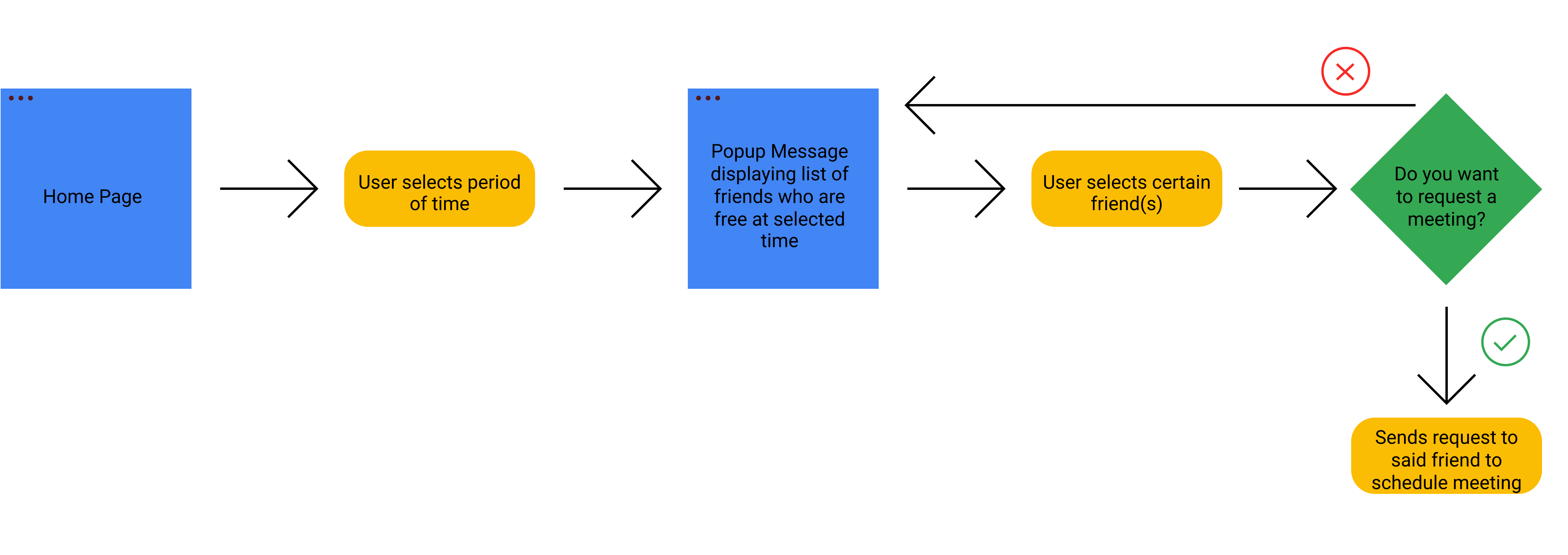
We then created various sketches of these features to better visualize these flows and begin forming the UI.
From Lo-fi to Hi-fi
After creating wireframes based on our sketches and getting some users to test the flow of each feature, we reexamined the scope of our project. This caused us to make many changes and narrow down our features to meet our users’ needs within the short timeframe we had to design. These changes included:
- Feature 1: Removing tags capabilities and simply allowing users to request to see another user’s calendar (Time/Scope Constraints). Adding hover functionality so users can see which contacts are available at which sections of time (Clarity and aesthetics).
- Feature 2: Allowed user to pick their preferred time from list view or calendar view (Consideration of multiple user mental models).
- Feature 3: Changed functionality to appear as an embedded section of the initial minimized event details page rather than requiring the user open to open the full-screen event details page (Minimizing cognitive load).
- Overall: Finalized functionality of buttons, event creation and naming across all 3 features (Branding and Consistency).
Feature 1 – Requesting Friends’ Calendars & Comparing Free Time
Feature 2 – Automatic Meeting Suggestion
Feature 3 – Manual Meeting Scheduling
Final Prototype
Click here to view our Figma Prototype.
*Please make sure you are viewing the “FINAL PROTOTYPE FLOW” to experience all 3 features.*
Learning Outcomes
After reflecting on our design process, it is most significant to me how the user’s needs are to be discovered by the designer rather than assumed. Going into this project, we had the idea that remote workers would take less care of themselves and have a harder time being active, an idea that came from our own experience becoming physically lazy throughout our time learning remotely. Our initial brainstorming sessions planned on promoting fitness for our users, but our user interviews told us that this was not what they needed. People were happy with their personal lives and practicing self care, but wanted more out of their social lives both in and out of the office. We had to pivot our stance and modify our initial ideas for improving their daily lives, and continued be flexible as we learned more about their needs through user testing. In this way, we catered to their needs rather than our assumptions.
Designers are not their users. Empathy and understanding of the user’s experience is the most important starting point for any project.
Thanks to Professor Philip Guo, IA/Mentor Neharika Makam, and my teammates, Kelly Nham & Saul Jimenez.
 Nadia Corral